Skip to content

For restaurants on Clover, in Canada

Your delivery orders, together in Clover

Manage delivery orders in one place, sync your menus, and check your payouts. Built in Montréal and used daily in our own kitchens.

Platforms

  • Uber Eats
  • DoorDash
  • SkipTheDishes
  • Too Good To Go*
  • Clover

* Too Good To Go: when your account offers an order feed.

The DoorDash and SkipTheDishes integration is in certification.

The TAKATAK Food Hub orders board: Uber Eats, DoorDash and SkipTheDishes orders from four locations, in new, preparing, ready and picked-up columns.
Stills of the real console, with demo data.

What changes in your kitchen

  • Every delivery order lands in Clover and on the kitchen printer — no more juggling tablets.
  • One master menu published to Uber Eats, DoorDash and Skip, with a markup per platform.
  • Out of stock in Clover = item off every platform within seconds.
  • Every platform payout checked against your orders: missing money is flagged.
  • An alert as soon as a store goes offline or an order is waiting for an answer.

Product

What your team sees every day

A console for the counter, a tablet for the kitchen, your Clover register in the middle. These are the real screens.

Orders

All your platforms on one board

Uber Eats, DoorDash and SkipTheDishes orders from every location and every brand land in one place. Each one moves from new to preparing, ready, then picked up.

  • Filters by location, brand and platform
  • A sound alert for every new order
  • The order is created in Clover and its ticket prints in the kitchen
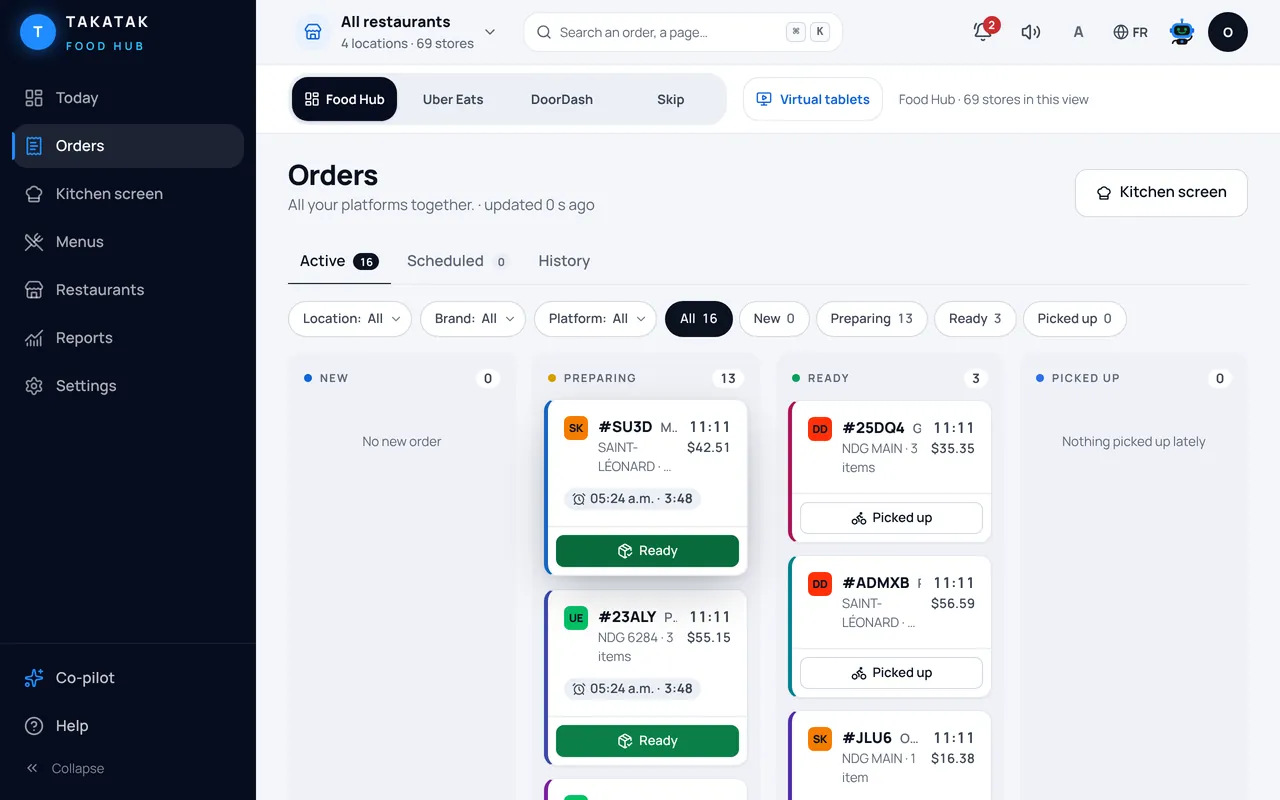
Orders board: new, preparing, ready and picked-up columns, with a “Ready” button on each order.

Kitchen screen

The kitchen sees every order, big

One tablet is enough. Items are in large type, each order has its timer, and a new order shows on top of everything until someone confirms it with one tap.

  • To cook, ready, courier arriving
  • Allergies and notes in red
  • Remind in one minute and reprint the ticket
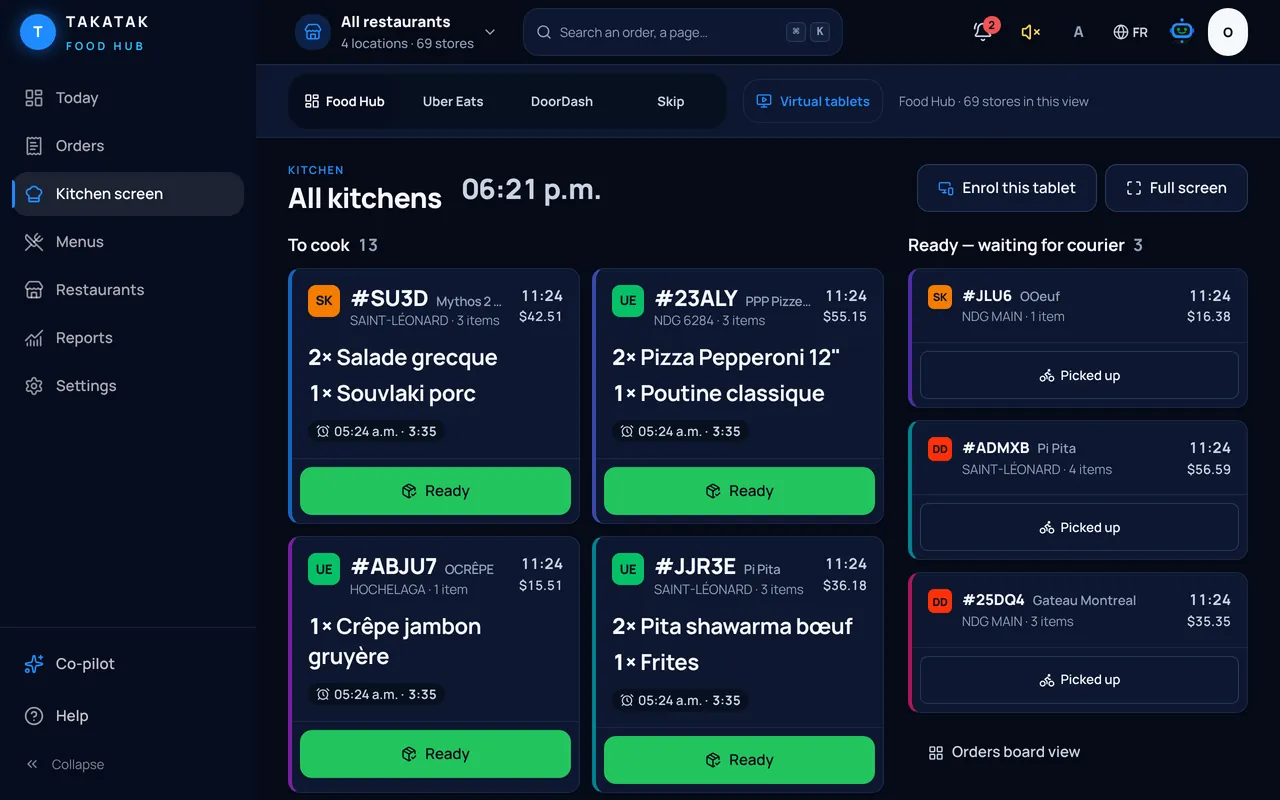
Kitchen screen in night colours: orders to cook as large cards, ready orders waiting for the courier on the right.
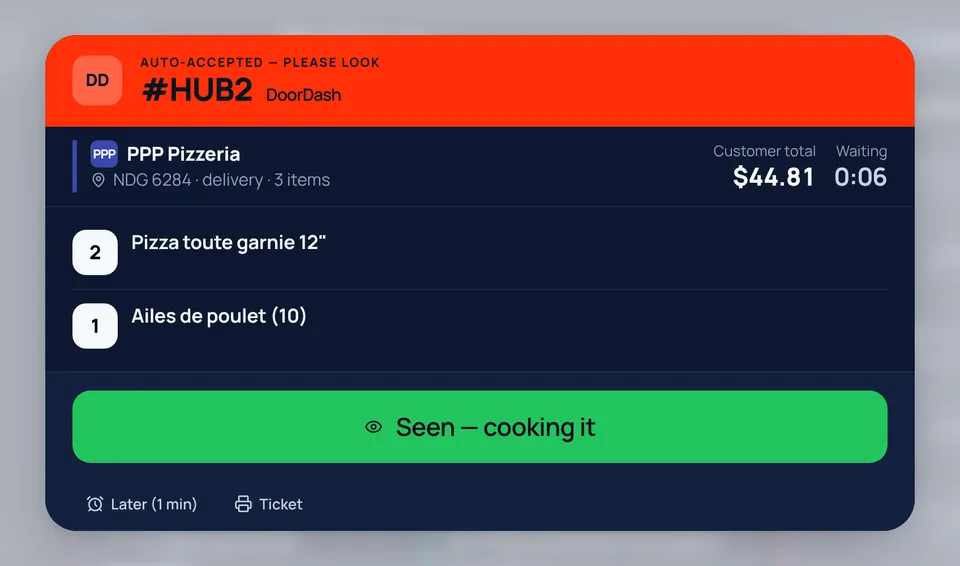
A new DoorDash order on top of the kitchen screen: the pizzeria, the total, the items and the “Seen — cooking it” button.

Today

Your day at a glance

Sales, orders, prep time and open stores, compared with the same time yesterday. The “To do” list shows what is waiting for an answer, like an order on hold or a store gone offline.

  • Platform sales and Clover in-store sales
  • An alert as soon as a store goes offline
  • Orders in progress, from every platform
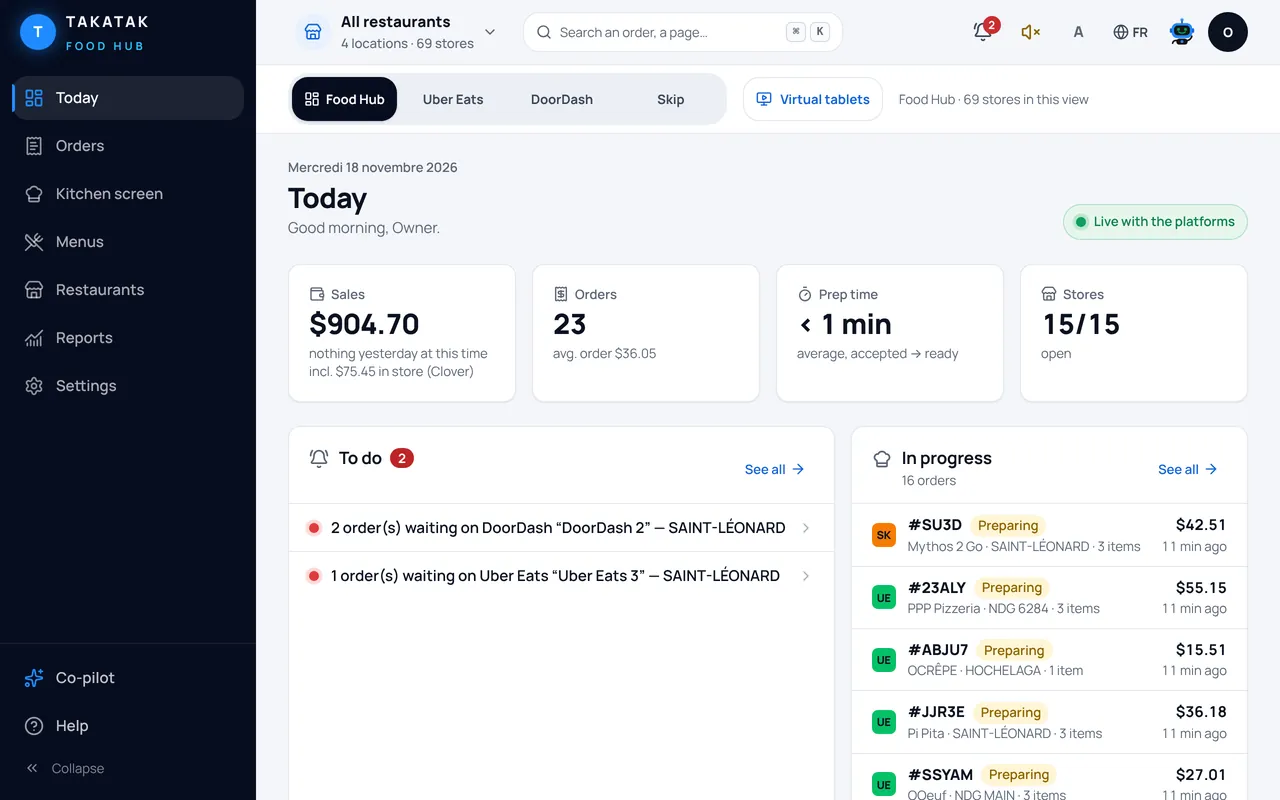
Today page: sales, order count, prep time, open stores, the To do list and the orders in progress.

Reports and money

Numbers you can check

Sales and trends compared with the previous period, by platform and by brand. Every platform payout is checked against your orders: missing money is flagged, and nothing is approved for you.

  • Excel export and a link to share
  • Lost (cancelled) sales counted on their own
  • Time to accept, prep time, time online
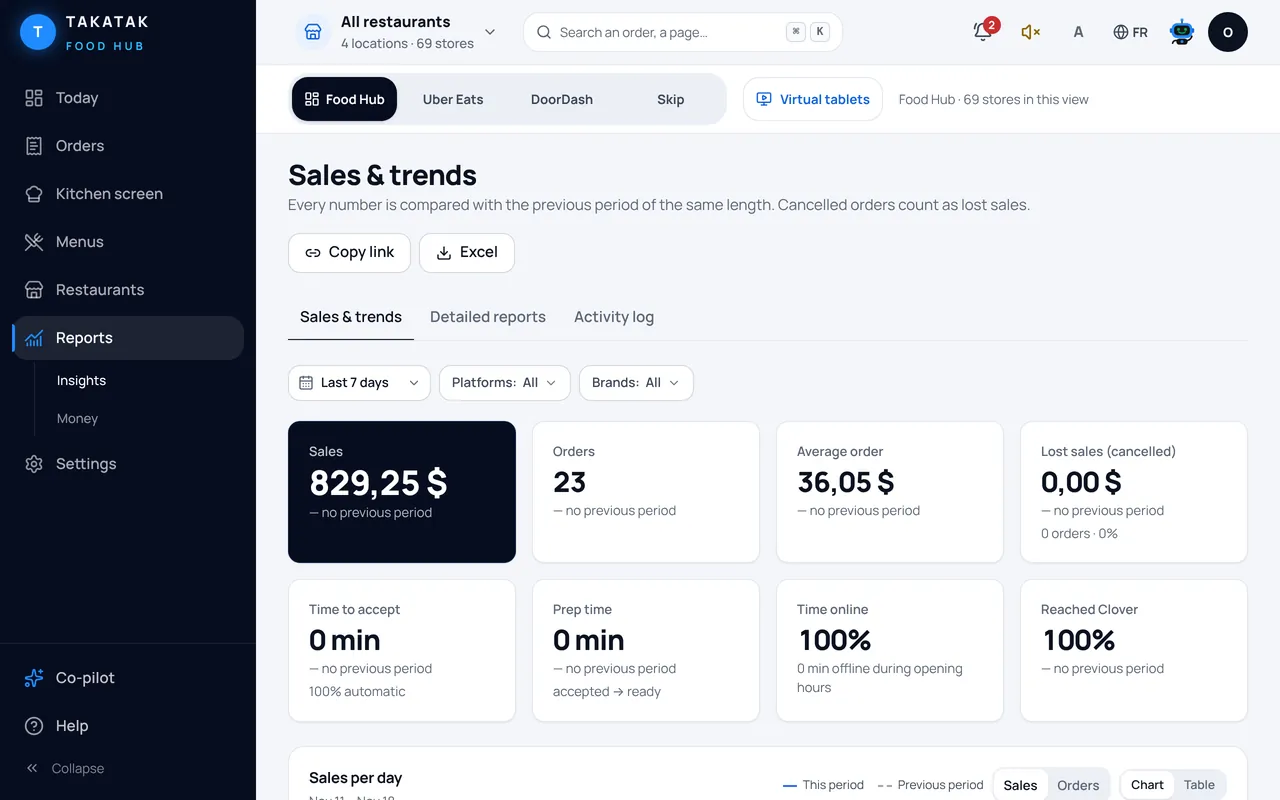
Sales and trends page: sales, orders, average order, lost sales, time to accept, prep time and time online.

Direct ordering

Your own ordering page

A pickup page in your restaurant’s name, in French and English. Customers pay at the counter or online through Clover, and the order reaches the register and the kitchen screen like every other one.

  • Turned on brand by brand, in Settings
  • Pay at the counter or online through Clover
  • The same ticket and the same kitchen screen
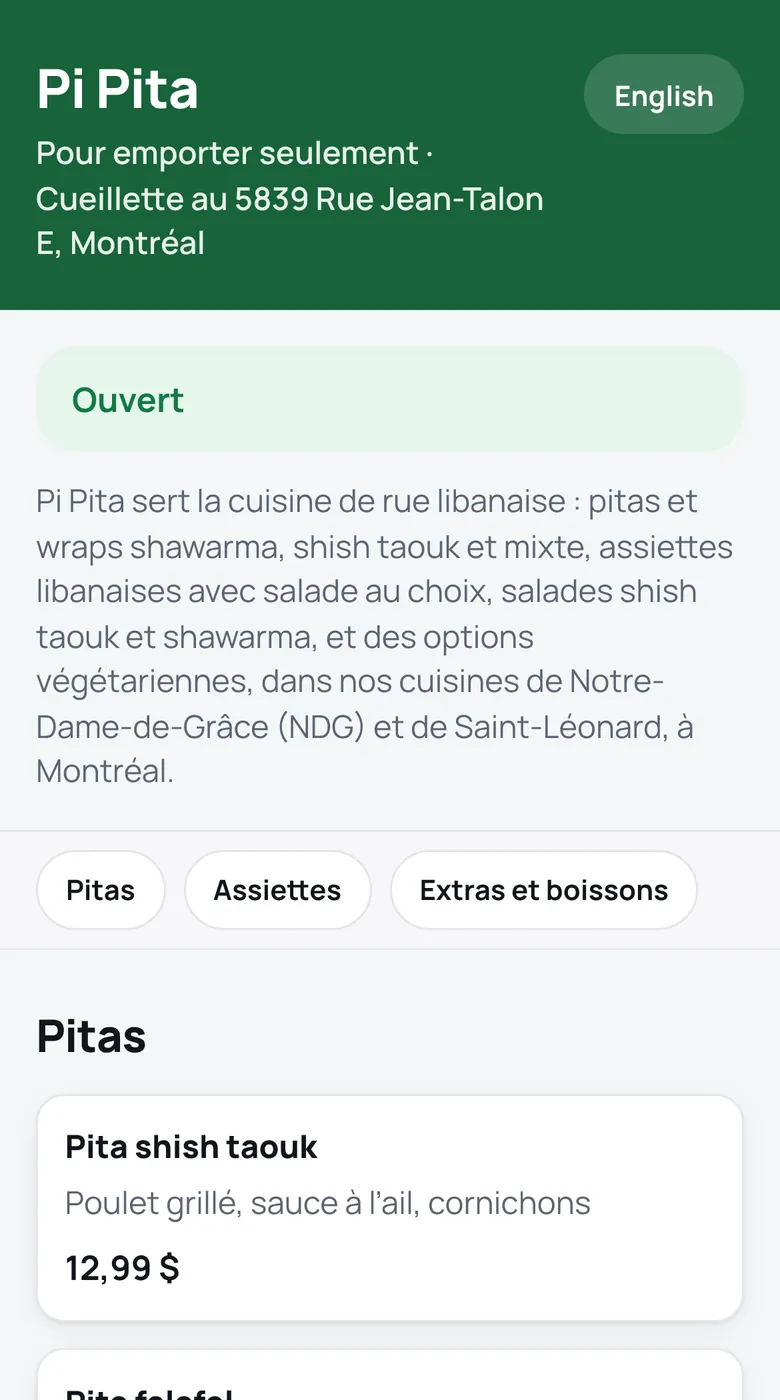
Pickup ordering page on a phone: the restaurant name, the pickup address, the categories and the dishes with their prices.

Stills of the real console, with demo data.

Up and running in three steps

  1. Install the app

    From the Clover App Market, on your restaurant’s Clover merchant account. The free trial starts at install.

  2. Connect your platforms

    Link your own Uber Eats, DoorDash or SkipTheDishes merchant accounts, then pick which brand and which location each store is.

  3. We approve your restaurant

    Our team checks each new restaurant before the first order is sent to its register. After that, orders arrive on their own.

Every feature

The same features as our Clover App Market listing, with no aggregator between you and the platforms.

  • Orders

    Uber Eats, DoorDash and SkipTheDishes orders (and Too Good To Go when your account offers an order feed) arrive with a sound alert, are accepted in one tap, created in Clover with an order type per platform and printed in the kitchen. Once they leave, they are recorded as paid with a tender per platform, so your Clover closeout is right.

  • Kitchen screen

    To cook, ready, courier arriving; allergies and notes in red; timers.

  • Menus

    Import your Clover inventory, check it, then publish one master menu to every platform with hours, holidays, scheduled categories and a % markup per platform.

  • Sold out (86)

    An item out of stock in Clover is taken off every platform; back on sale everywhere in one click.

  • Stores

    Pause or reopen a location on every platform, busy mode and prep time.

  • Money

    Every platform payout is checked against your orders; fees, refunds, adjustments and missing money are flagged. Nothing is approved or posted automatically: you decide.

  • Team

    Sign-in by code (email or text), roles, manager PIN for anything that touches money.

  • Several brands, one kitchen

    Each brand keeps its own menu and stores on every platform, and every order lands in the same Clover register.

  • AI phone: TAKATAK Phone AI

    A separate Clover app with its own subscription: an automated assistant answers ordering calls, sends the order to Clover and texts the customer a Clover payment link.

Integrations and tools

What you need

A Clover plan that includes Inventory and Orders, a Clover device with an order printer, your own Uber Eats, DoorDash or SkipTheDishes merchant accounts, and a TAKATAK Food Hub account — each new restaurant is approved by our team before any order is sent to its register.

Built in Montréal, connected to On2GO

TAKATAK Food Hub is built in Montréal by Quadro Holdings LTEE and runs every day in our own kitchens, in Notre-Dame-de-Grâce and Saint-Léonard. Each feature comes from a real kitchen problem: too many tablets, menus that drift apart, payouts that are hard to check.

Food Hub connects to On2GO, the local restaurant directory: every listed restaurant gets its own page and visibility there. The two projects are separate and are presented together.

Service and interface are in French and English.

on2go.ca

Pricing

Available on the Clover App Market

days of free trial
14
per month, per app
CAD $50
per month, per extra brand, per platform
+CAD $15

Your first brand is included. Billed by Clover. Amounts in Canadian dollars. Plus applicable taxes.

TAKATAK Phone AI: 14-day free trial, then CAD $50/month, + CAD $0.25 per AI minute. Plus applicable taxes, billed by Clover.

Get the apps on Clover

  • TAKATAK Food Hub

    Orders from all your delivery platforms, straight into your Clover register.

    Install From Clover App Market
  • TAKATAK Phone AI

    AI answers your phone orders and texts the customer a Clover pay link.

    Install From Clover App Market

Frequently asked questions

Do I need a delivery aggregator?

No. TAKATAK Food Hub connects straight to the delivery platforms and to your Clover register, with nothing in between.

Which platforms are supported?

Uber Eats, DoorDash and SkipTheDishes, plus Too Good To Go when your account offers an order feed. The DoorDash and SkipTheDishes integration is in certification.

What Clover hardware do I need?

A Clover plan that includes Inventory and Orders, and a Clover device with an order printer.

Does TAKATAK Food Hub process card payments?

No. Customers pay on the delivery platform. TAKATAK Food Hub only records the order as paid in Clover, with a tender named after the platform, so your closeout is right.

Why an approval before the first order?

So that no order ever goes to the wrong register. Our team checks that each delivery store is linked to the right Clover location before the flow is opened.

Is the app in French?

Yes. The whole interface is in French and English, and each team member picks their language.

How do TAKATAK Food Hub and On2GO relate?

They are two separate projects. TAKATAK Food Hub connects the delivery platforms to your Clover register; On2GO (on2go.ca) is the local restaurant directory, where every listed restaurant gets its own page and visibility. Food Hub connects to On2GO.

All your delivery platforms, one Clover register

Tell us about your kitchen: we show you your orders in Clover, with your brands and your locations.